
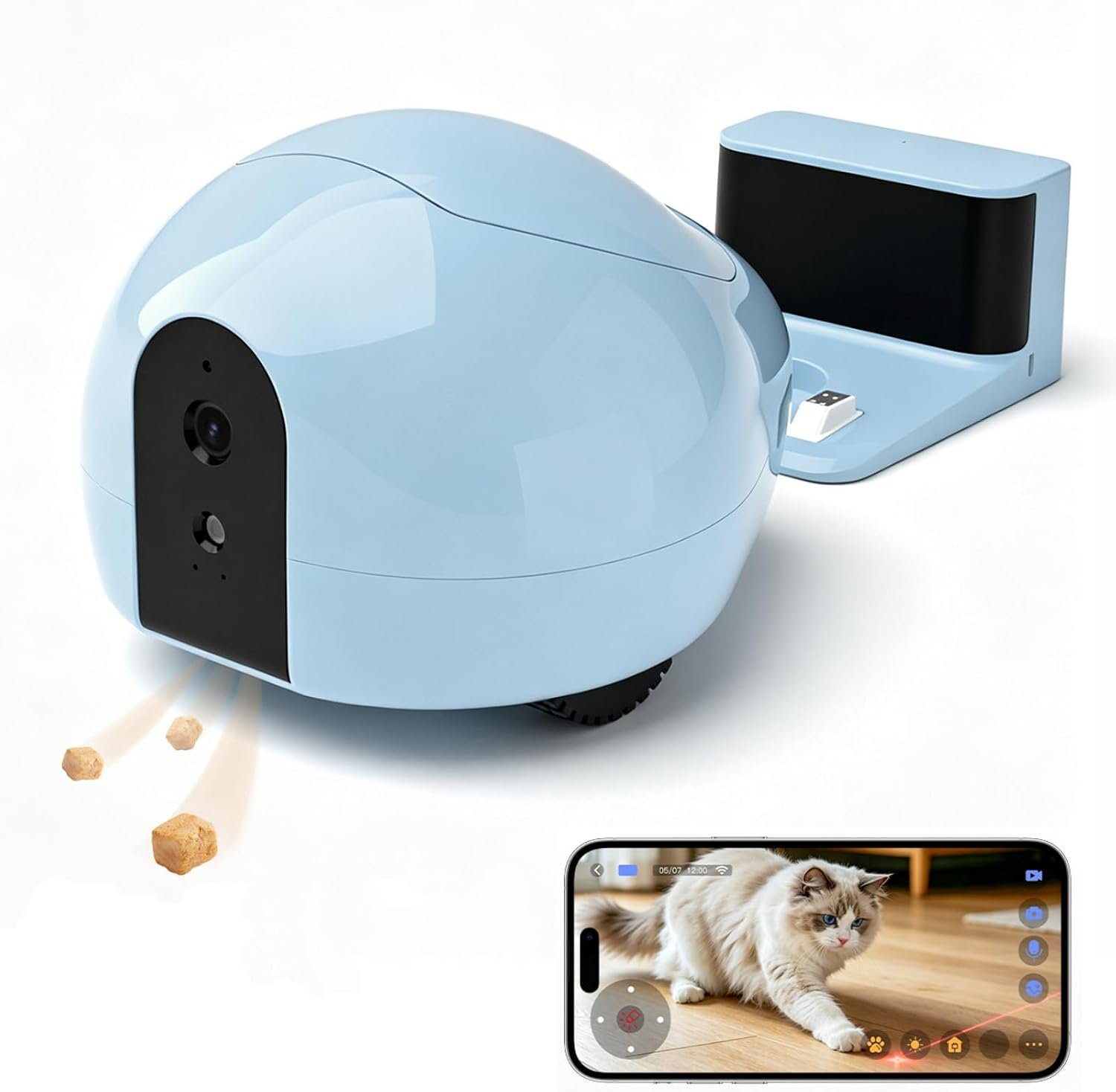
Pet Camera Robot with Treat Dispenser & Laser, Mobile Cat & Dog Home Companion, Remote Control Pet Monitor with Two-Way Audio, 2K Night Vision, App Control & Auto Recharge
$179.00
Related Products
![Furbo [New Mini 360° Camera + Mini Cam [New Subscription Required at Setup] (2-Camera Bundle Nanny Subscription): Pet Safety Alerts, Dog & Cat Cameras with Speaker, Phone App & Night Vision](https://pawsitivepicks.com/wp-content/uploads/2026/08/71orm4L7SCL._AC_SL1500_.jpg)



Product description
The video showcases the product in use.The video guides you through product setup.The video compares multiple products.The video shows the product being unpacked. PUMPKII Pet Camera Robot


1 Treat Dispenser
2 Interactive Cat Toy
3 Mobile Pet Camera


1 Spots Your Pet
2 Real-Time Alerts
3 Subscribe
How to bind 

Package Details 
No “beep” sound when pairing?
If there’s no beep when powering on, hold the bottom button for 10 seconds to reset. If it still doesn’t work, wait 3 seconds and hold the power button for 10 more seconds.
Why can’t I connect to the device when I’m away from home (4G/5G network)?
Please Exit and reopen the app, then try reconnecting. If the signal is weak, you may need multiple attempts. If the issue persists, reset the device to factory settings and rebind it in the app.
What should I do if the video doesn’t open after the device is successfully paired?
Press and hold the power button on the bottom for over 10 seconds to reset the device, then pair it again and try opening the video.
Note: You may need to repeat the reset 3 or more times in some cases.
How do I reset the device to factory settings?
Press and hold the power button on the bottom of the device for more than 10 seconds until you hear the reset prompt, then release the button. When the device starts beeping continuously, it has entered pairing mode and is ready to be set up again.
2.4G Wi-Fi Compatibility?
Pumpkii only supports 2.4GHz Wi-Fi. If using a mesh router, it will connect automatically—no need to separate 2.4GHz and 5GHz. 5GHz-only networks aren’t supported; use 2.4GHz or dual-band Wi-Fi for stable connection.
Why does the device sometimes take longer to connect?
Weak network signals can slow down the connection. Try again or check your network. You can also refresh the connection by opening the app, going to Account → Device List → your device → Restart.
What should I do if Pumpkii fails to auto-charge?
Ensure the dock is against a wall within 3 m of Pumpkii. Tap “Auto-Charge” and wait a few seconds; if not found, guide Pumpkii closer. Keep other IR devices away. Auto-charge triggers only at 50% and 20% battery.
Where can I find the captured pet clips?
You can view the recordings and history on the “Discover” page, in Highlights, or directly from the SD card.
Robot keeps saying “Back to Charger” after removal. How to fix?
A brief software delay or leftover signal may appear, but it won’t affect use and can be ignored. The robot only auto-charges when the battery drops below 50%.
Feeding tray not rotating properly?
If the tray doesn’t rotate, remove it and press it back until it clicks. Then test via the app. If one section rotates smoothly, the tray is working. Repeat as needed.
Product Dimensions : 8.66 x 7.28 x 5.91 inches; 3.65 pounds
Item model number : BQ75
Batteries : 1 A batteries required. (included)
Date First Available : June 23, 2026
Manufacturer : pumpkii
ASIN : B0H6FF9XHX
Best Sellers Rank: #293,275 in Pet Supplies (See Top 100 in Pet Supplies) #570 in Pet Cameras & Monitors
Customer Reviews: 3.0 3.0 out of 5 stars (2) var dpAcrHasRegisteredArcLinkClickAction; P.when(‘A’, ‘ready’).execute(function(A) { if (dpAcrHasRegisteredArcLinkClickAction !== true) { dpAcrHasRegisteredArcLinkClickAction = true; A.declarative( ‘acrLink-click-metrics’, ‘click’, { “allowLinkDefault”: true }, function (event) { if (window.ue) { ue.count(“acrLinkClickCount”, (ue.count(“acrLinkClickCount”) || 0) + 1); } } ); } }); P.when(‘A’, ‘cf’).execute(function(A) { A.declarative(‘acrStarsLink-click-metrics’, ‘click’, { “allowLinkDefault” : true }, function(event){ if(window.ue) { ue.count(“acrStarsLinkWithPopoverClickCount”, (ue.count(“acrStarsLinkWithPopoverClickCount”) || 0) + 1); } }); });
🤖【Moving Pet Camera Robot , More Than a Pet Camera】: Unlike fixed pet cameras, BQ75 moves around your home to help you find, watch, and interact with your pets. Control your pet robot remotely and stay connected with cats, dogs, and small pets anytime
🐾【Remote Pet Care & Interactive Companion, Stay Connected When Away】: When you’re not at home, BQ75 helps you care for and engage with your pets remotely. Check in, dispense treats, activate interactive play, and create fun moments that bring joy to both you and your furry friends
🍖【Treat Dispenser, Reward Pets Anytime】: The built-in treat dispenser lets you give dry treats remotely through the app. Keep dogs, cats, and small pets excited with fun rewards even when you’re not home
🔴【Interactive Laser Toy , Keep Pets Engaged】: Activate interactive laser play modes through the app to encourage movement and play. BQ75 helps keep cats and small pets entertained during alone time
💬【Two-Way Audio Pet Camera , Stay Close While Away】: Talk to your pets and hear them through the built-in microphone and speaker. BQ75 helps you provide comfort and connection wherever you are
🌙【2K Pet Camera with Night Vision , See More Clearly】: Monitor your pets day and night with clear 2K video and infrared night vision. Capture photos and record videos of your pets’ daily moments through the app
🔋【Auto-Recharging Pet Robot , Always Ready for Play】: When battery runs low, BQ75 automatically returns to the charging dock. Enjoy more reliable pet monitoring, play, and interaction without frequent charging
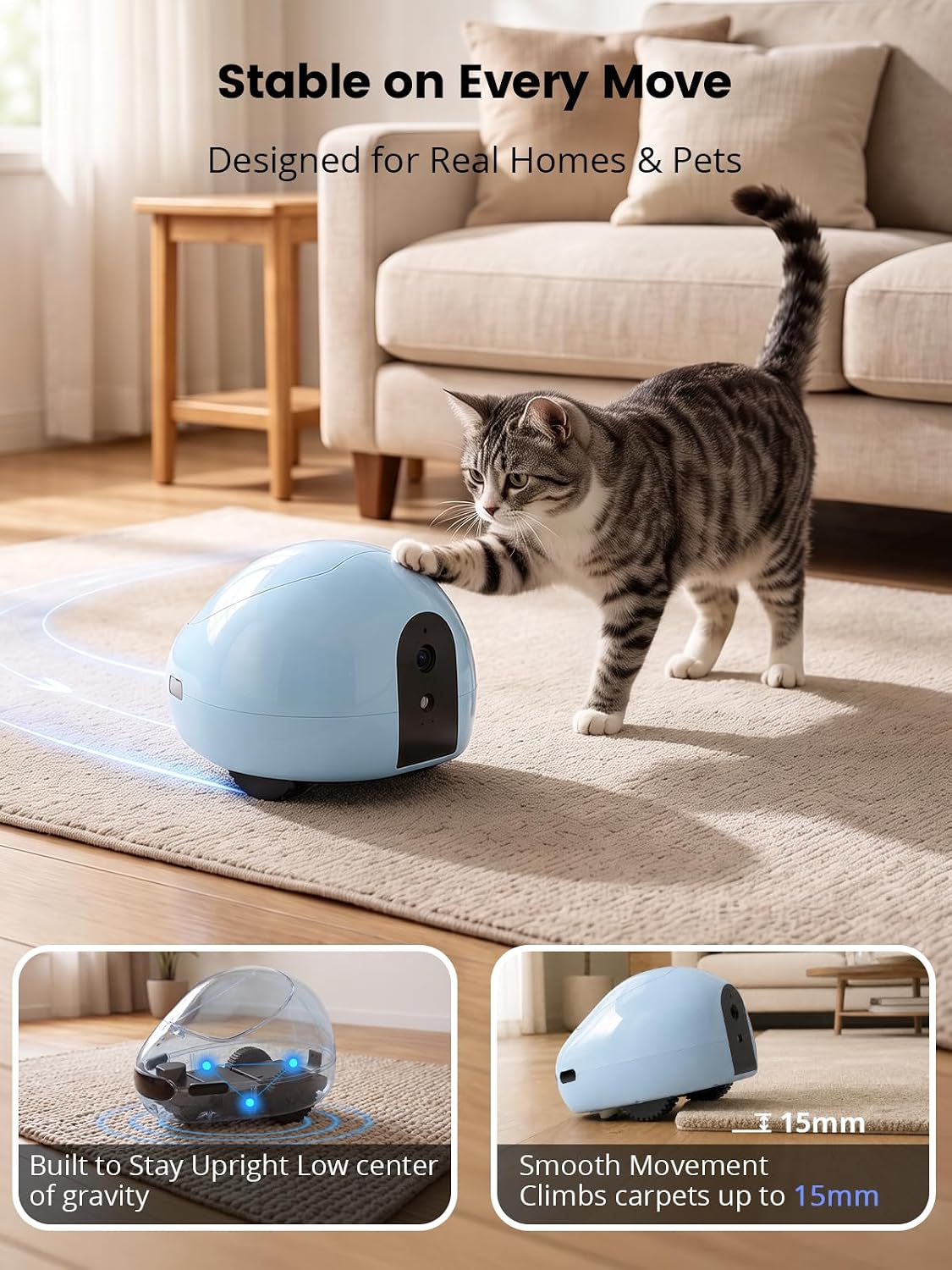
🏡【Stable Home Navigation , Built for Everyday Spaces】: Designed with stable movement for everyday homes, BQ75 smoothly travels across floors and rugs(up to 15mm thick) while exploring different areas with your pets
📱【Easy App Control】: Use the PumPlus app to control movement, monitor pets, communicate, dispense treats, activate play modes, and enjoy interactive pet care from your smartphone
2 reviews for Pet Camera Robot with Treat Dispenser & Laser, Mobile Cat & Dog Home Companion, Remote Control Pet Monitor with Two-Way Audio, 2K Night Vision, App Control & Auto Recharge
Add a review
$179.00
chef andy –
John W. –